Real receipt flow

See how one WhatsApp receipt becomes a clean record.

Send the photo, PDF, or voice note your team already has. Memo pulls the vendor, unit, category, amount, and note, then updates the 30-day spend view.

Opens WhatsApp with a ready-to-send message.

Photos, PDFs, and voice notes Vendor and unit context Owner-ready weekly summaries
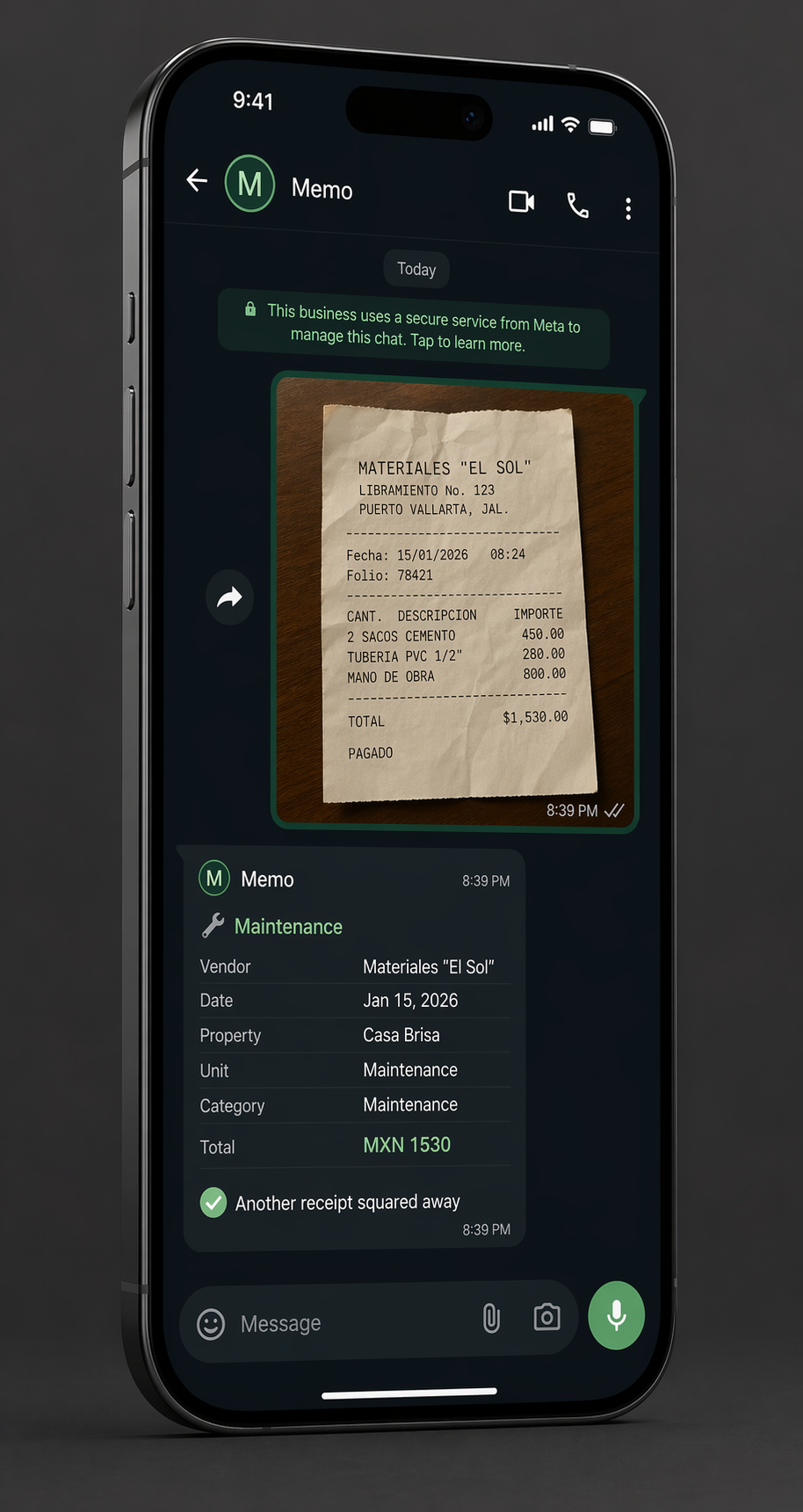
Example output
Vendor
Materiales "El Sol"
Property / Unit
Casa Brisa / Unit 3
Category
Maintenance & Repairs
Total
MXN 1,530
Memo summary inside a WhatsApp conversation on a phone screen.
What Memo keeps Amount, vendor, property, category, and the thread context that usually gets lost later.
WhatsApp receipt Materiales "El Sol" 15 / Ene / 2026 · 08:39
Sacos cemento
$450.00
Tubería PVC 3/4
$280.00
Mano de obra
$800.00

Total $1,530.00 MXN

Memo record Logged
Vendor
Materiales "El Sol" / Carlos Ramirez
Property
Casa Brisa / Unit 3
Note
Cement, PVC piping, and repair labor
Source amount
MXN 1,530
Memo total
USD 88.74
Proof in one receipt

Receipt in. Clean record out.

This is the kind of record Memo creates from one forwarded receipt, so you can inspect the source MXN amount, converted USD total, unit, category, and vendor without rebuilding the thread later.

What did we spend? Which unit? Who did the work? Is it logged?
Four quick steps

Your team stays in WhatsApp. Memo cleans up the record.

01

Send it in WhatsApp

Carlos forwards the Materiales "El Sol" receipt from Casa Brisa / Unit 3, plus a quick voice note if there is context.

Input: photo, PDF, or voice note.

02

Memo builds the record

Vendor, category, unit, date, USD 88.74, and the original MXN 1,530 land together, with the repair note attached.

Output: vendor, unit, category, total, note.

03

The spend view updates

The 30-day view, top category, vendor list, and receipt flow health update without waiting for closeout.

View: spend, forecast, vendors, missing receipts.

04

Owners get a cleaner answer

Weekly summaries can say what changed, what is missing, and why maintenance spend moved.

Answer: clean enough to send without rebuilding the week.

WhatsApp in motion

The work stays in chat. The visibility shows up later.

Memo is built for busy operators in Mexico and LatAm who need fewer admin steps, cleaner MXN records, and faster owner answers.

  • Receipts and notes stay attached to the real operating context.
  • Vendor movement is visible without rebuilding the week in a spreadsheet.
  • Owner questions get answered from a record, not from memory.
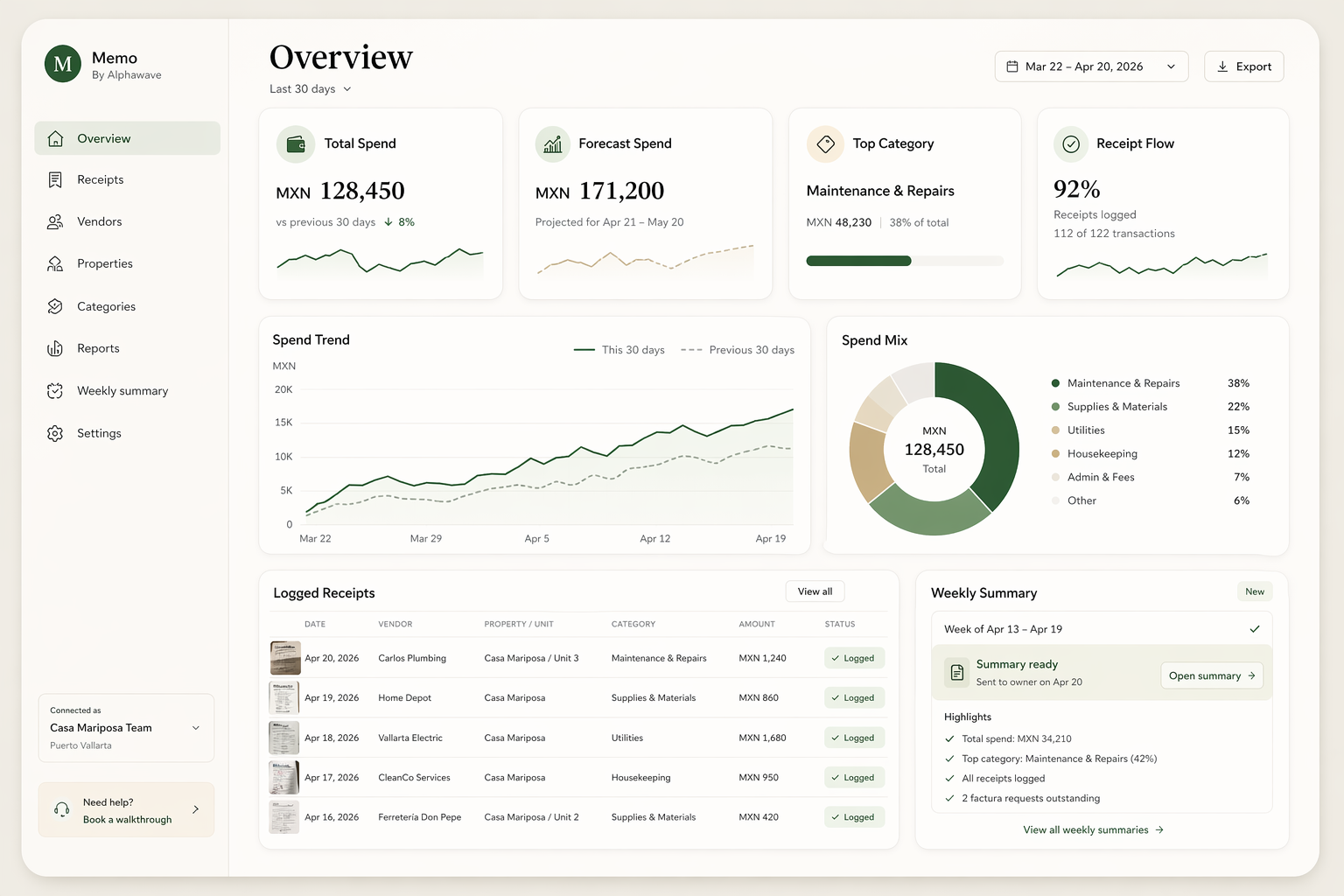
MXN 128,450 last 30 days of spend
Maintenance top category before closeout
92% receipt flow logged
Memo dashboard with spend overview and vendor activity.
Spend pace Vendor movement Missing receipts Weekly summary
What gets easier

Fewer cleanup loops. Better weekly answers.

Captured automatically

Memo holds onto the details operators usually lose.

  • Receipt photo or PDF
  • Voice note summary
  • Vendor and property context
  • Category and total in MXN
Answered faster

The dashboard is built for the questions owners actually ask.

  • What did we spend this month?
  • Which vendors moved?
  • Is this month running hot?
  • What changed before Friday?
FAQ

Quick answers before we chat.

Can my team forward receipts from existing WhatsApp chats?

Yes. Memo is designed around the chats your team already uses. Forward a photo, PDF, voice note, or vendor message and Memo starts the record from there.

What happens if Memo reads something wrong?

You can review and correct the record before relying on it. The goal is less cleanup, not blind automation.

Do vendors or cleaners need to change anything?

No. They can keep sending receipts and context the way they do now. Memo sits on top of the operator workflow instead of retraining the field team.

Can it handle PDFs, photos, and voice notes?

Yes. Memo supports receipt photos, PDFs, and voice notes. Text-only forwarded payment confirmations are still not the main workflow.

How fast can we test this with one property?

A walkthrough can start with one real receipt flow. If the fit is there, you can test Memo with a narrow property or team workflow before rolling it out wider.

Next step

Bring the real receipt flow your team runs now.

We'll map Memo to your current workflow, show the first live test, and tell you plainly if the fit is not there yet.

The walkthrough starts in WhatsApp, not a form.